Point-in-Time Recovery
SeaweedFS Enterprise Point-in-Time Recovery (PITR) reconstructs what a path prefix — or a single object — looked like at a chosen moment in the past, within the same retention window that powers Data Recovery. Where Data Recovery answers “show me what was deleted and bring it back,” PITR answers “make this folder look the way it did at 14:00” — reverting overwrites, restoring deletes, and reconciling a whole subtree to a single instant in one operation.
Most data-loss incidents aren’t clean deletes: a bad ETL run rewrites objects with corrupt output, a migration overwrites a dataset in place, an AI agent edits files it shouldn’t. The files still exist — they just hold the wrong bytes — so a delete-oriented tool can’t see the damage. PITR works from the filer’s metadata change log, so it sees overwrites and renames too.
When to use it
- A job or migration corrupts data in place — an ETL run or schema migration overwrites objects with bad output. A delete-recovery tool sees nothing; PITR reverts them to their pre-job content.
- An AI agent rewrites the wrong files — roll the affected subtree back to the moment before the agent ran, without disturbing unrelated work.
- A bad sync or rename leaves a tree in the wrong state — reconstruct the prefix as it was, including files that were renamed away.
- You need a specific object’s earlier version — open one file’s full history in the window and restore any past version, not just the most recent deletion.
- An incident needs a reviewable rollback — compute a plan, see exact counts and per-path changes, stage them to a safe copy, and only then apply in place.
How to use it
1. Turn on a retention window on the master — the same -deletionRetention window that powers Data Recovery:
weed server -master.deletionRetention=72h
The default 0 disables both Data Recovery and PITR. The free 25 TB trial caps the window at 1 hour; a full license unlocks longer windows.
2. Recover from the Admin UI:
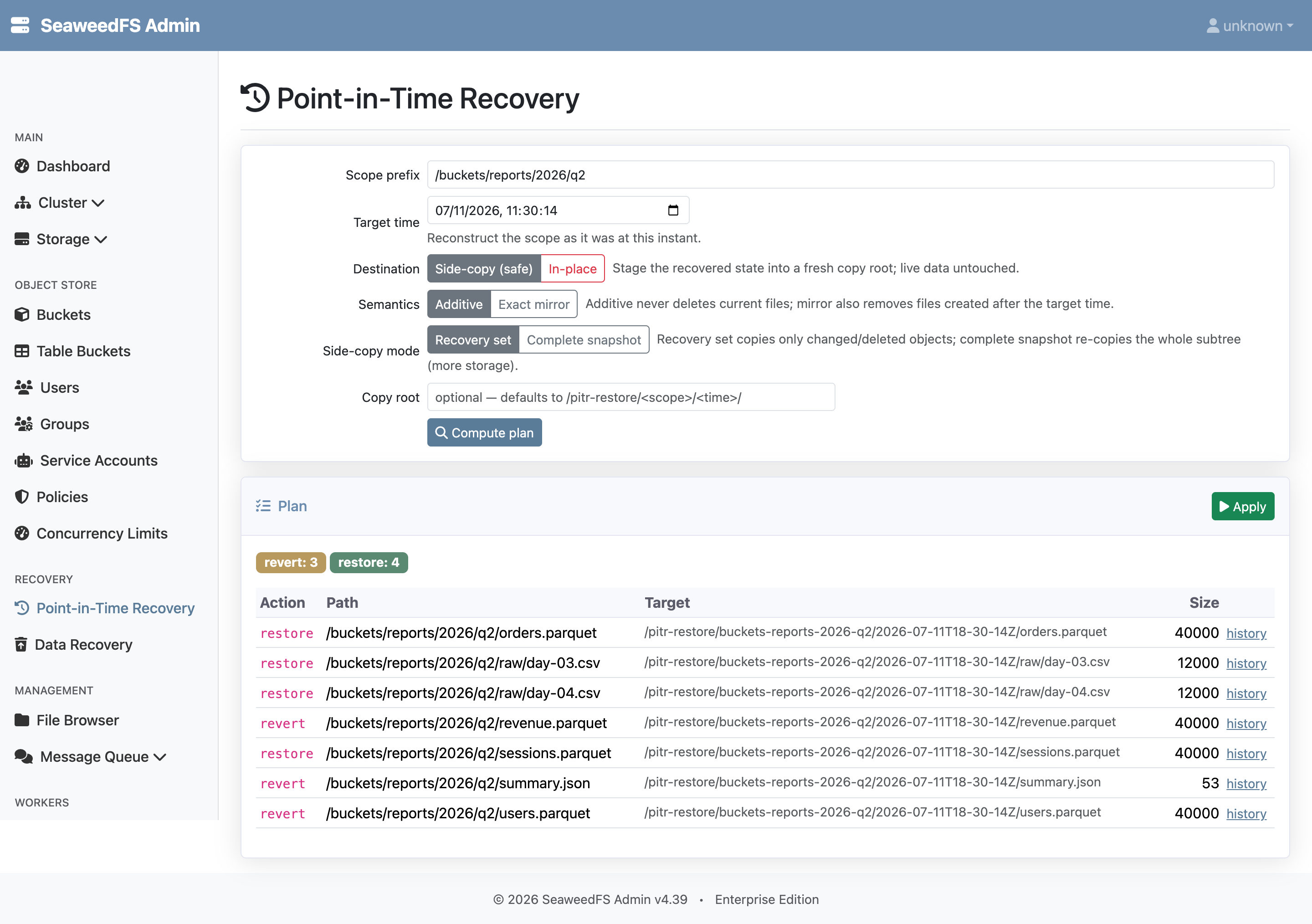
- Open the Admin UI → Recovery → Point-in-Time Recovery.
- Enter a scope prefix and a target time, choose the destination (side-copy or in-place) and semantics (additive or exact mirror), and click Compute plan.
- Review the counts and per-path table, then click Apply; an in-place apply prompts for a typed confirmation.
- To work with one object, open its history from a plan row and restore any listed version.
The safe defaults — side-copy (stage into a fresh location, never touch live data) and additive (only restore what was lost, never delete a current file) — mean nothing is overwritten until you ask for it.
Benefits
- Recover from corruption, not just deletion — roll back in-place overwrites from bad jobs, migrations, and agent edits that delete-recovery tools can’t see.
- Reviewable, low-risk rollback — preview exact per-path changes, stage to a safe copy, and apply in place only after a typed confirmation bound to what was previewed.
- Whole-subtree consistency — reconcile an entire prefix to one instant in a single operation, instead of restoring objects one at a time.
- Per-object time travel — restore any past version of a single file from its history in the window.
- No new infrastructure — PITR reuses the retention window, metadata log, and restore engine that Data Recovery already provides.
Want the internals — how state is reconstructed at a time, the plan/confirm/apply flow, the destination and semantics matrix, plus the full HTTP API and limits? See the Point-in-Time Recovery technical reference.